

Understanding Opera Cloud R&A Data Access and Security in Simple Practical Terms
May 18, 2026As an OPERA PMS user, you already know that past transactions can normally be adjusted in the following ways:
- If the guest is still in-house, you can right-click the transaction in Billing, select Adjust Transaction, and proceed with either a percentage adjustment or a fixed amount adjustment.
- If the guest is already checked out, you can still reopen the folio and post the adjustment.
In both scenarios above, OPERA creates a counter transaction. The original posting remains on the original business date, while the adjustment belongs to the current adjustment date.
So No change to the audited business date. That is normal OPERA behavior and it is not the topic we are discussing here.
What we are going to discuss is something many finance teams do not expect.
Most Finance Controllers believe:
“Once a business date is closed, the figures can never change.”
And honestly, in most situations, they are right. OPERA generally works that way.
But rarely, OPERA can behave differently.
In some situations, historical figures such as revenue, non-revenue, or payment in ledgers, trial balance, and even Manager Flash values from long past business dates can change after special system correction procedures are performed.
Hotel Complains
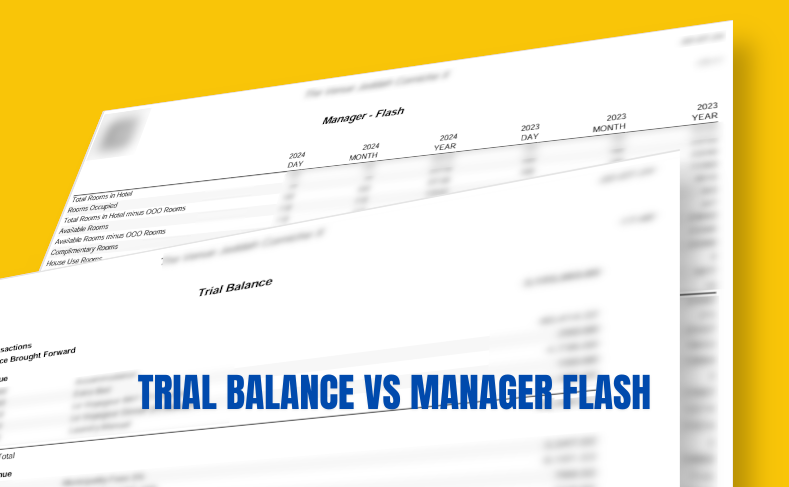
The finance team reported that the revenue figures in the Manager Flash report were not matching. But the interesting part was this:
- The Manager Flash report from EOD Reports showed one value.
- The Manager Flash report from Miscellaneous > Reports showed another value.
- The same issue was noticed with Trial Balance related figures as well.
Experience IT managers can think of refreshing the trial balance would resolve the issue. But it will not.
At the same time, the SUN back-office system had already finalised the accounting period using the figures from the original archived EOD reports. So the figures changed afterwards. and the team realised this after their accounting period is closed.
Naturally, this created concern for the finance team because from their perspective:
- the business date was already closed,
- reports were already archived,
- and accounting had already been finalized.
So why were the figures suddenly different?
Understanding the Difference Between EOD Reports and Live Reports
The Manager Flash report generated during End of Day is basically an archived snapshot of the data at the end of that specific date. It is usually stored as a PDF during the night audit process.
That means:
- it is not a live report,
- it does not continuously refresh,
- and it will not automatically reflect future backdated corrections made in the database.
On the other hand, the Manager Flash report generated from: Miscellaneous > Reports is a live report.
It reads the current data directly from the database at the moment the report is generated.
However, you recreate EOD reports with the exception that you cannot recreate any ledger reports such as Deposit Ledger, Guest Ledger, Package Ledger, or AR Ledger.
The Root Cause of the issue raised by the hotel
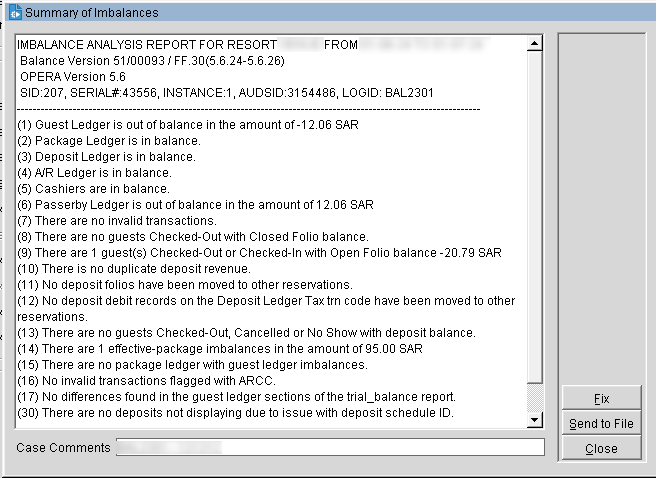
After investigation, we found that the OPERA Balance Correction Tool had been executed after the original business date was closed.
This tool is used to identify and fix any reported financial imbalances in the system. When the tool detects an imbalance, it allows the support team to proceed with a correction process, the ‘Fix.’
Unfortunately, you cannot selectively fix only the reported imbalances, but it fixes any imbalances during the checked period (user who runs it, can give a date range to check for the imbalances).
It detects the imbalances and awaits user to proceed with the fix procedure that can be ignored for the moment.
However, experienced OPERA support consultants usually do not perform these fixes without approval from the hotel finance team because these corrections can impact historical audited figures.
And this is exactly what happened in this case.
The balance correction process adjusted historical transactions in the database.
As a result:
- live reports started showing the corrected figures,
- but the archived EOD PDFs still contained the older values generated before the correction.
Technically, this is expected OPERA behavior.
But operationally, it can create confusion, especially for finance teams and auditors. Safest way is to proceed with the fix once the hotel finance approves it so there is no surprise.
For whatever reason, by ignoring a fix imbalance, the hotel continues to work with the wrong figures and ledgers.
Run Fix and Recreate EOD Reports
When the imbalance is found, the logical solution was clear: get the approval from the hotel finance and proceed to fix it. And, then take a hard-copy or save the EOD reports as backup and recreate EOD reports to refresh them from EOD > Reports:
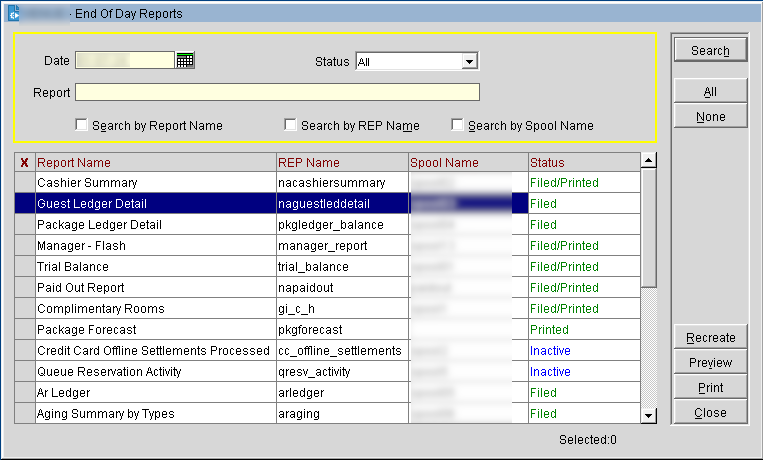
The Recreate button is disabled:
Typically, the business dates might have been technically rolled over during night audit, but you might still have some business dates still open due to some report printing tasks had failed because of printer or export related issues. Ensure to close those open dates.
To verify this, you can go to the EOD screen as if you are about to run Night Audit again (do not run EOD). If you see the next business date here, you do not have any pending business dates and you can safely exit.
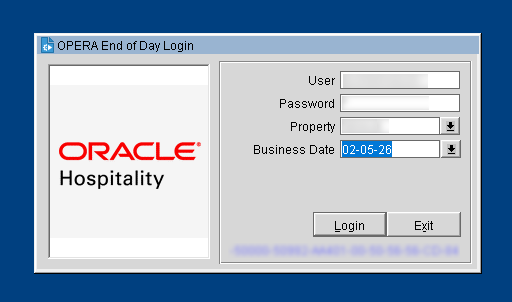
Or, you will see dates still appear in the drop-down list, it means these dates are still open. Select each of these unfinished dates and ‘Continue’ EOD which will resume from where it stopped and finish successfully.
If your hotel is using Opera’s ‘Income Audit’ functionality, your finance team already know where to complete the EOD (from PMS > End of Day option).
Recreation Completed – But Finance May Become More Concerned
After fixing the imbalance and recreating the reports, the archived Manager Flash finally will match the live reports from Miscellaneous > Reports.
Technically, the issue is resolved. But now a new concern might appear:
In our sample case, recreated report showed approximately 80 USD lower than the previously archived report that finance had already used for back-office reconciliation and period closure.
Naturally, the Finance Controller was concerned because from their perspective:
- audited figures should never change,
- accounting had already been finalised,
- and now the recreated report showed different numbers.
Honestly, this concern is understandable.
But technically, OPERA had already corrected the imbalance in the database and the original EOD report was generated. The recreated report is actually reflecting the corrected and current database values.
The older archived PDF was simply outdated.
Important Notes
This case highlights several important operational lessons for hotel IT and finance teams.
1. Archived EOD Reports Are Static Snapshots: They are not live reports. Once generated, they remain unchanged unless manually recreated.
2. Live Reports Always Reflect Current Database Values. Reports generated from Miscellaneous > Reports will always reflect the latest corrected data.
3. Balance Correction Tools Can Affect Historical Figures. Although rare, OPERA balance correction processes can modify historical financial values if imbalances are detected and corrected.
4. Finance and IT Teams Must Communicate Clearly. When historical figures change, finance teams can naturally become concerned. Proper explanation and supporting documentation are very important in such situations.
5. Back Office Adjustments May Be Required. If accounting periods are already finalized in systems such as SUN, finance teams may need to pass adjustment entries in the back-office system to keep it aligned with OPERA PMS. If the period is not yet closed in back office, reverse the journal in back office and re-import it from Opera.
Supporting documentation should always be retained for audit purposes.
Final Thoughts
Once a business date is closed, figures remain stable and unchanged. But special correction procedures inside OPERA PMS can occasionally affect historical data.
Understanding the difference between archived EOD reports and live database reports is very important for both IT and finance teams.
