

Opera Cloud Reporting & Analytics (R&A): A Beginner’s Guide in Simple, Practical Terms
May 12, 2026Understanding Revenue Changes on Audited Business Dates in OPERA PMS
May 23, 2026One of the most common situations many users experience in Opera Cloud Reporting & Analytics (R&A) is this:
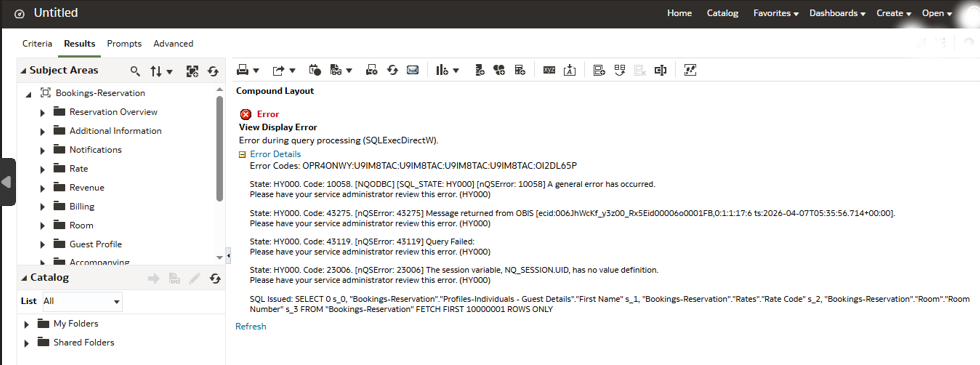
“The report runs… but no data appears.” Or sometimes:
- Dashboards are empty
- Subject Areas are missing
- Another user can see reports, but you cannot
- One property is visible while another is not
At first, many users assume: “R&A is broken.”
But in many cases, the actual reason is related to:
- user assignments
- property visibility
- security groups
- hierarchy configuration
- OCIM access setup
And honestly, this is one of the biggest learning curves for many Opera Cloud users entering R&A for the first time.
In this article, I want to explain R&A data access and security in simple practical terms based on real operational situations many hotel IT teams, consultants, and users experience.
Why R&A Access Feels Different from Opera v5
In Opera v5 environments, reporting access was often simpler to understand. Many of us were used to:
- direct report access
- local report visibility
- user permissions tied closely to the application itself
In Opera Cloud, things become more centralized.
R&A now depends heavily on:
- OCIM identity management
- hierarchy-based access
- property assignments
- group visibility
- role-based permissions
Because of this, two users logging into the same environment may see completely different data.
At first, this can feel confusing, especially for users transitioning from Opera v5 reporting environments.
Understanding R&A Data Access in Simple Terms
One of the most important things to understand is: In R&A, users do not automatically see all data.
Visibility depends on:
- which properties are assigned
- which access groups are configured
- which hierarchy level the user belongs to
- which roles are assigned through OCIM
This means:
- one user may see multiple hotels
- another may see only one property
- another may see dashboards but no data inside them
The system is designed this way intentionally to control data visibility securely across cloud environments.
Understanding Enterprise, Chain, and Property Access
This is one area that initially confuses many users.
In simple terms, R&A access is often structured in levels such as:
- Enterprise level
- Chain level
- Property level
Think of it like a visibility hierarchy. Some users may have:
- full enterprise visibility
- access to multiple hotels within a chain
- or access to only a single property
This depends entirely on how assignments and access groups are configured.
For example:
- Regional management may need chain-wide visibility
- Property users may need access only to their own hotel
- Corporate analytics teams may require enterprise-level reporting
Once this hierarchy concept is understood, many R&A access behaviors start making much more sense.
Why Some Reports Show No Data
This is probably one of the most common operational frustrations in R&A.
A report opens successfully…
but:
- no records appear
- dashboards remain empty
- subject areas are unavailable
In many cases, the issue is not the report itself.
Instead, it may be caused by:
- missing property assignments
- incomplete security configuration
- incorrect hierarchy access
- missing RNAACCESS groups
- OCIM role assignment problems
This is why troubleshooting R&A often starts with checking:
“What access does this user actually have?” rather than immediately assuming the report is broken.
Simple Practical Test to Check R&A Assignments
From practical experience, one of the quickest ways to identify an access-related issue is to compare visibility between users.
Here are some simple checks many consultants and IT teams use:
Check 1 – Compare Dashboards Between Users
Ask:
- Can another user see the same dashboard?
- Does the dashboard display data for them?
If yes, the issue may be assignment-related rather than report-related.
Check 2 – Verify Property Visibility
Try checking:
- Which properties appear for the user?
- Can they switch between properties?
- Are expected hotels missing?
Sometimes users are simply not assigned to the required property scope.
Check 3 – Verify Subject Areas
If Subject Areas are missing entirely, this may indicate:
- security configuration issues
- incomplete group assignments
- incorrect access roles
Check 4 – Test in Private/Incognito Browser
This is a very practical tip: After security changes or reassignment updates:
- old browser sessions
- cached permissions
- stale login sessions
may continue using previous access settings.
Testing in:
- Incognito mode
- Private browser window
can sometimes immediately confirm whether updated assignments are working correctly.
From practical experience, one of the quickest ways to identify an assignment issue is by checking visibility behavior directly inside R&A.
Step: 1
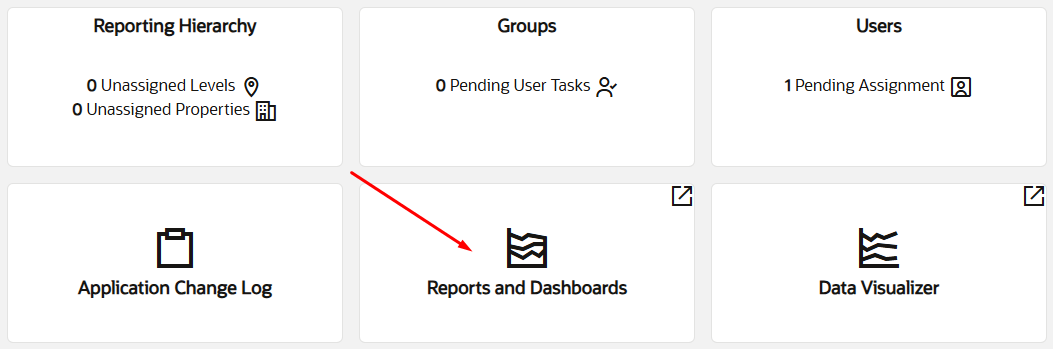
Step: 2
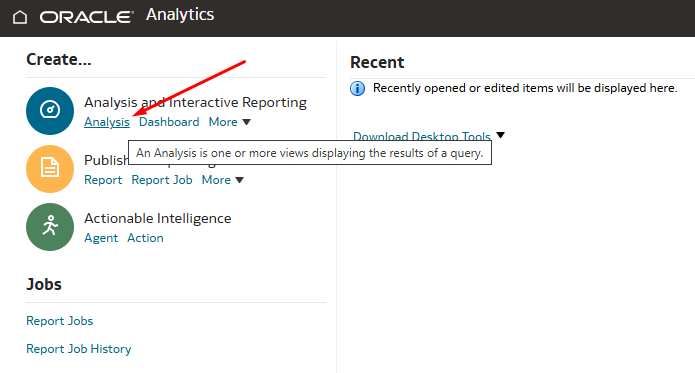
Step: 3
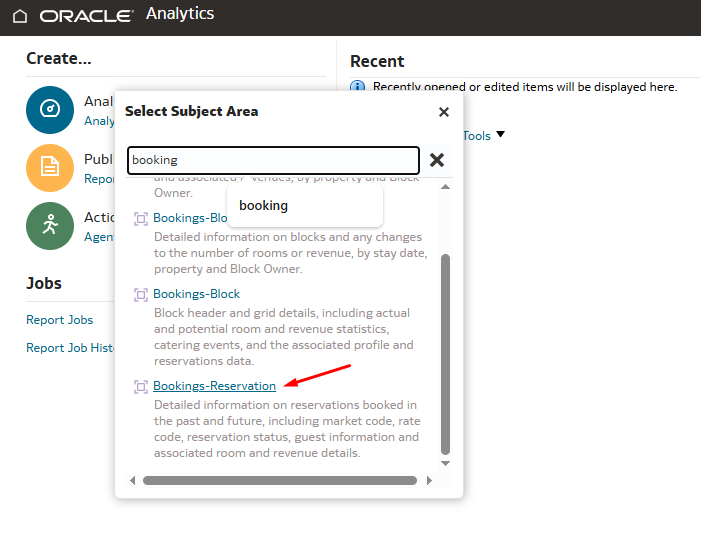
Step: 4
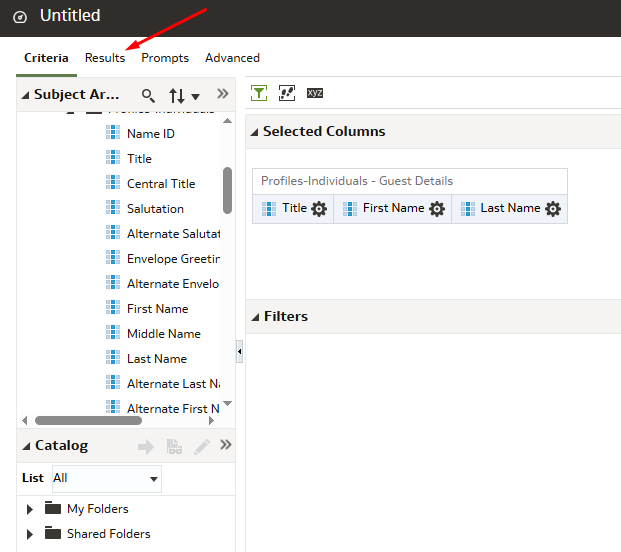
Step: 5
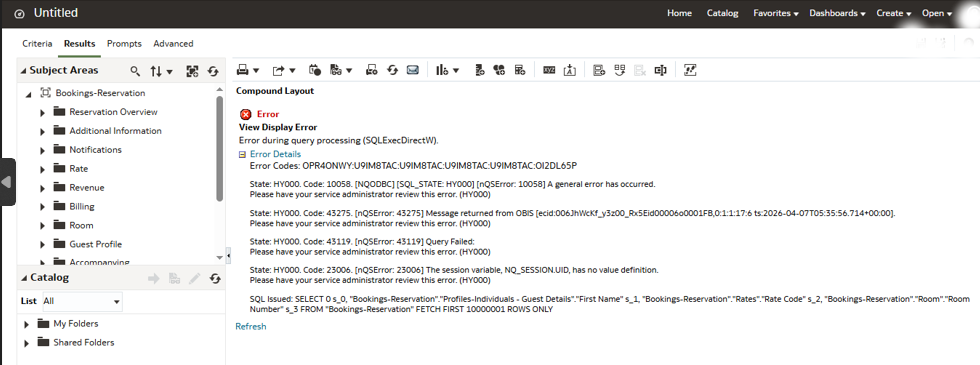
“The session variable, NO_SESSION.UID, has no value definition” error here.
Understanding OCIM and RNAACCESS Groups
One of the biggest mindset shifts in Opera Cloud is the close relationship between:
- OCIM
- R&A
- access groups
- security assignments
R&A access is commonly controlled using RNAACCESS groups.
These may include:
- enterprise-level groups
- chain-level groups
- property-level groups
The important thing to understand is not the naming itself, but the concept behind it:
Access visibility is controlled through structured group assignments.
This is why:
- some users see dashboards
- some users see only limited data
- some users cannot access Subject Areas at all
even when logging into the same environment.
Why Different Users May Experience R&A Differently
One situation that often confuses hotel teams is this:
Two users may:
- log into the same R&A environment
- open the same dashboard
- or run the same report
yet still experience different results.
For example:
- one user may see data
- another may see blank sections
- one may access multiple properties
- another may see only one hotel
At first, this can make R&A feel inconsistent.
But in most cases, the reason is related to:
- property assignments
- hierarchy visibility
- security group configuration
- OCIM access setup
This is why understanding R&A access structure becomes just as important as understanding the reports themselves.
Common Beginner Mistakes
From practical experience, some very common beginner misunderstandings include:
Assuming the Report Is Broken
In many cases, the report itself is working correctly.
The issue is actually visibility or assignment-related.
Confusing Dashboard Visibility with Data Visibility
A user may successfully open a dashboard but still not have permission to view underlying data.
Forgetting Property Assignments
Sometimes users simply do not have access to the required hotel or reporting scope.
Not Refreshing Sessions After Assignment Changes
After security updates, old sessions may still use previous permissions.
This is why testing in a private/incognito browser can be very useful.
Why Understanding R&A Security Matters
As Opera Cloud environments continue growing, reporting security becomes increasingly important.
Hotels now operate with:
- centralized cloud environments
- cross-property reporting
- enterprise analytics
- remote access users
- regional operational visibility
Because of this, Oracle designed R&A access to be more structured and security-driven than traditional reporting environments.
At first this may feel more complicated than Opera v5.
But once the relationship between:
- assignments
- hierarchy
- roles
- property visibility
- OCIM access
is understood, R&A becomes much easier to troubleshoot and manage.
Final Thoughts
When entering Opera Cloud R&A for the first time, many users naturally focus on reports and dashboards.
But in reality:
understanding access and visibility is equally important.
From my experience, many situations involving:
- empty dashboards
- missing data
- unavailable Subject Areas
- inconsistent report visibility
eventually lead back to one area:
Note: assignments and security configuration.
The good news is:
once the access structure is understood in practical terms, troubleshooting becomes much easier and much less intimidating.
And just like many other areas in Opera Cloud, confidence grows step by step with practical experience.
References
